> ## Documentation Index
> Fetch the complete documentation index at: https://docs.oculusproxies.com/llms.txt
> Use this file to discover all available pages before exploring further.
# How to Set Up Oculus Proxies with AdsPower
> Simplify your multi-account management! Integrating AdsPower with Oculus Proxies enhances your ability to manage multiple accounts, automate tasks, and stay undetected. Follow this step-by-step guide to set up Oculus Proxies in AdsPower securely and efficiently.
 ## What is AdsPower?
**AdsPower** is a powerful multi-account management tool designed for marketers, e-commerce sellers, and social media managers. It allows you to operate multiple accounts securely without the risk of detection or bans.
Each browser profile in AdsPower has a unique digital fingerprint—including its own IP address, device type, and user agent—ensuring complete separation between accounts.
Whether you’re scaling e-commerce stores, running social media campaigns, or managing affiliate marketing efforts, AdsPower makes handling multiple accounts seamless and secure.
If you're using **Oculus** to access search engines like **Google, Bing, or Yandex** and facing connection issues, the proxy type could be the issue. **ISP Premium Proxies** ensure stable and unrestricted access, preventing blocks that standard proxies might encounter. Switching to **ISP Premium Proxies** can help maintain smooth and reliable performance.
## How to Integrate Oculus Proxies with AdsPower
1\. Visit the official [AdsPower website](https://www.adspower.com/download).
2\. Download the installer for your operating system.
3\. Install and launch the AdsPower application.
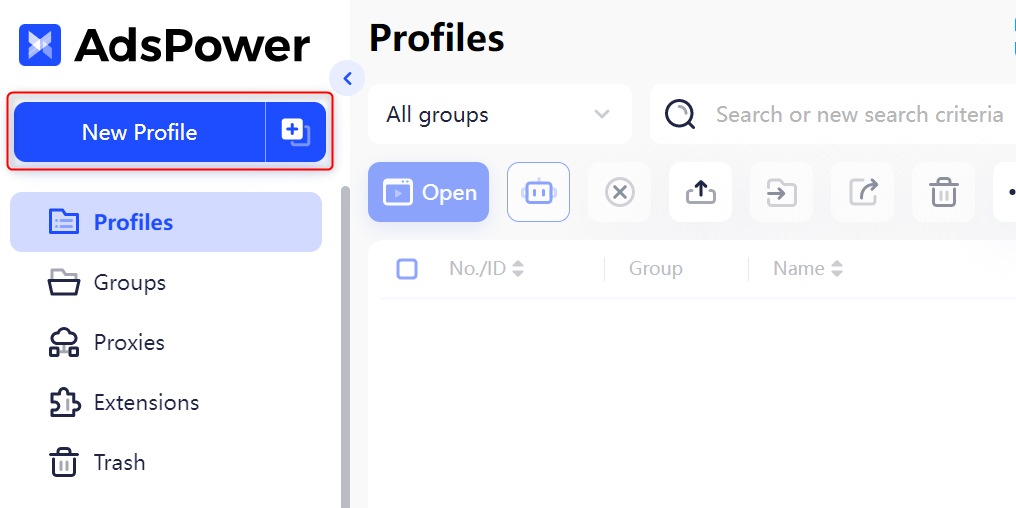
Open **AdsPower** and click the **New Profile** button to create a new browser profile.
## What is AdsPower?
**AdsPower** is a powerful multi-account management tool designed for marketers, e-commerce sellers, and social media managers. It allows you to operate multiple accounts securely without the risk of detection or bans.
Each browser profile in AdsPower has a unique digital fingerprint—including its own IP address, device type, and user agent—ensuring complete separation between accounts.
Whether you’re scaling e-commerce stores, running social media campaigns, or managing affiliate marketing efforts, AdsPower makes handling multiple accounts seamless and secure.
If you're using **Oculus** to access search engines like **Google, Bing, or Yandex** and facing connection issues, the proxy type could be the issue. **ISP Premium Proxies** ensure stable and unrestricted access, preventing blocks that standard proxies might encounter. Switching to **ISP Premium Proxies** can help maintain smooth and reliable performance.
## How to Integrate Oculus Proxies with AdsPower
1\. Visit the official [AdsPower website](https://www.adspower.com/download).
2\. Download the installer for your operating system.
3\. Install and launch the AdsPower application.
Open **AdsPower** and click the **New Profile** button to create a new browser profile.
 1\. In the profile setup, navigate to the **Proxy Settings** section.
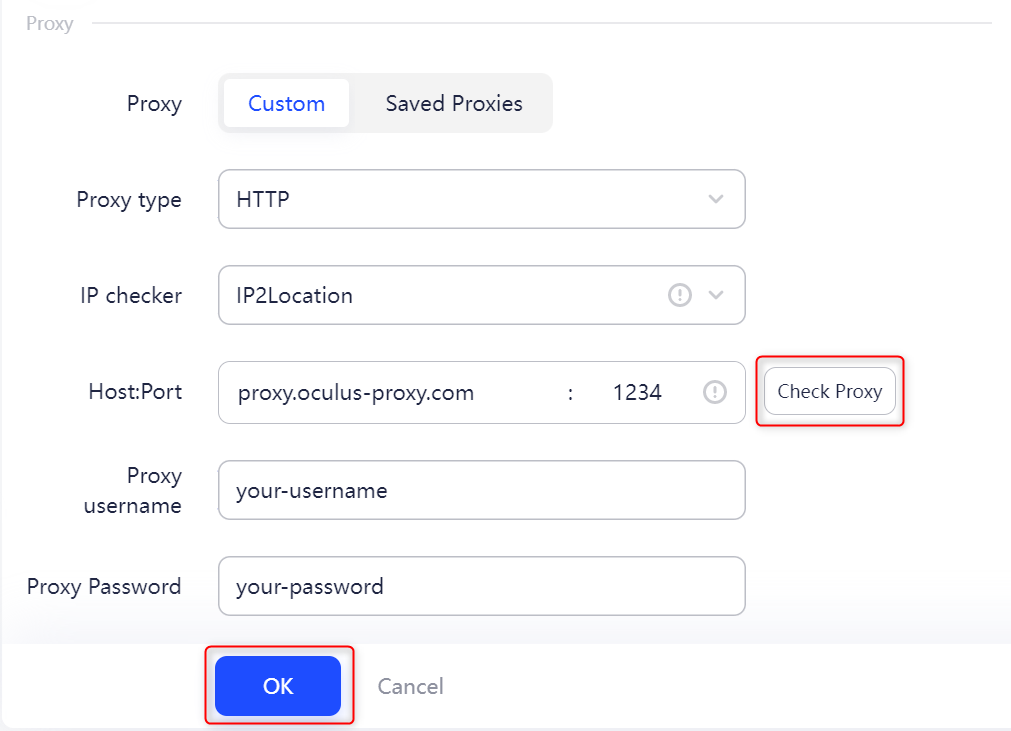
2\. Enter your **Oculus Proxy** details as follows:
* **Proxy Type:** Select `HTTP`, `HTTPS`, or `SOCKS5` based on your proxy type.
* **Proxy Host:** Enter `proxy.oculus-proxy.com`.
* **Proxy Port:** Use the port number from your [Oculus dashboard](https://oculusproxies.com/dashboard/page/plans).
* **Proxy Username:** Enter your Oculus proxy **username**.
* **Proxy Password:** Enter your Oculus proxy **password**.
3\. Click **Check Proxy** to test the connection.
4\. Once verified, click **OK** to save your proxy settings.
1\. In the profile setup, navigate to the **Proxy Settings** section.
2\. Enter your **Oculus Proxy** details as follows:
* **Proxy Type:** Select `HTTP`, `HTTPS`, or `SOCKS5` based on your proxy type.
* **Proxy Host:** Enter `proxy.oculus-proxy.com`.
* **Proxy Port:** Use the port number from your [Oculus dashboard](https://oculusproxies.com/dashboard/page/plans).
* **Proxy Username:** Enter your Oculus proxy **username**.
* **Proxy Password:** Enter your Oculus proxy **password**.
3\. Click **Check Proxy** to test the connection.
4\. Once verified, click **OK** to save your proxy settings.
 **For country-specific proxies, you can enter a format like `your-username-country-US` to receive a US exit node.**
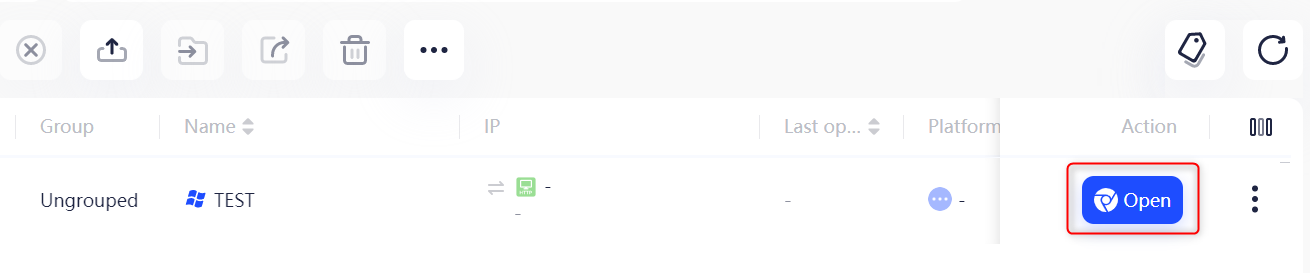
1\. In **Profile Management**, find the profile you created.
2\. Click **Open** under the **Tags** section to launch the browser with your configured proxy.
**For country-specific proxies, you can enter a format like `your-username-country-US` to receive a US exit node.**
1\. In **Profile Management**, find the profile you created.
2\. Click **Open** under the **Tags** section to launch the browser with your configured proxy.
 **Congratulations!** You’ve successfully integrated **Oculus Proxies** with **AdsPower**. You can now securely manage multiple accounts, automate workflows, and access geo-specific content without the risk of detection or bans. 🚀