> ## Documentation Index
> Fetch the complete documentation index at: https://docs.oculusproxies.com/llms.txt
> Use this file to discover all available pages before exploring further.
# How to Set Up Oculus Proxies with Apify
> Optimize your web scraping workflows with Oculus Proxies and Apify. Learn how to configure proxies for anonymous, efficient, and uninterrupted data extraction.
 ## What is Apify?
**Apify** is a powerful web scraping and automation platform designed for large-scale data extraction, price monitoring, and competitor analysis. With an extensive library of **ready-to-use scraping tools** in the **Apify Store**, you can automate web tasks without writing custom code—simply configure a few settings, and you're ready to go.
If you're using **Oculus** to access search engines like **Google, Bing, or Yandex** and experiencing connection issues, your proxy type may need adjustment. **ISP Premium Proxies** provide stable, unrestricted access and help prevent blocks that standard proxies might encounter. Switching to **ISP Premium Proxies** can enhance performance.
## How to Integrate Oculus Proxies With Apify
1\. Visit the [Apify website](https://apify.com/) and log in to your account.
2\. Navigate to the **Apify Store** to browse available tools.
3\. For this guide, we’ll use the [**Web Scraper**](https://apify.com/apify/web-scraper) actor as an example.
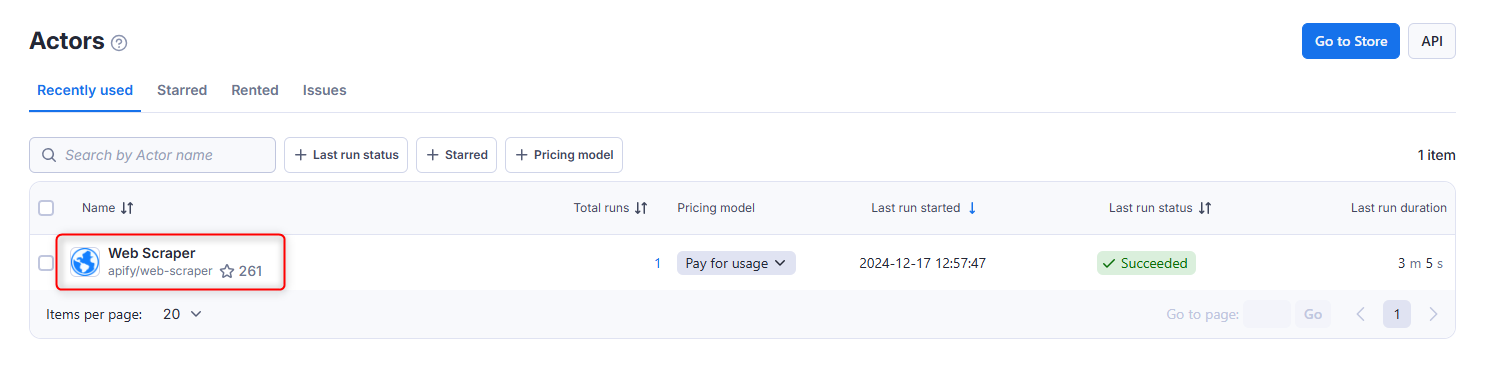
1\. From the **Apify Dashboard**, click on **Actors** in the left-hand menu.
2\. Select the **Web Scraper** actor or another suitable actor for your scraping needs.
## What is Apify?
**Apify** is a powerful web scraping and automation platform designed for large-scale data extraction, price monitoring, and competitor analysis. With an extensive library of **ready-to-use scraping tools** in the **Apify Store**, you can automate web tasks without writing custom code—simply configure a few settings, and you're ready to go.
If you're using **Oculus** to access search engines like **Google, Bing, or Yandex** and experiencing connection issues, your proxy type may need adjustment. **ISP Premium Proxies** provide stable, unrestricted access and help prevent blocks that standard proxies might encounter. Switching to **ISP Premium Proxies** can enhance performance.
## How to Integrate Oculus Proxies With Apify
1\. Visit the [Apify website](https://apify.com/) and log in to your account.
2\. Navigate to the **Apify Store** to browse available tools.
3\. For this guide, we’ll use the [**Web Scraper**](https://apify.com/apify/web-scraper) actor as an example.
1\. From the **Apify Dashboard**, click on **Actors** in the left-hand menu.
2\. Select the **Web Scraper** actor or another suitable actor for your scraping needs.
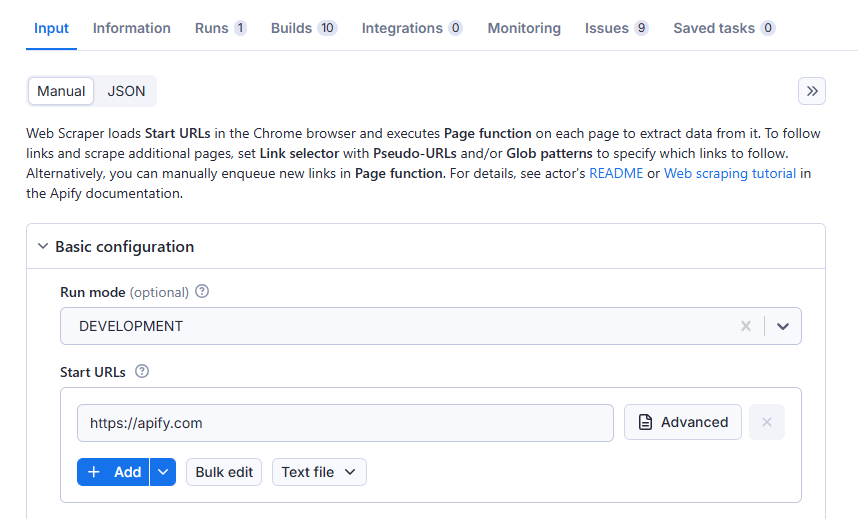
 1\. In the **Input** tab, find the **Basic Configuration** section.
2\. Enter the URLs of the websites you want to scrape.
3\. You can add multiple URLs depending on your project requirements.
1\. In the **Input** tab, find the **Basic Configuration** section.
2\. Enter the URLs of the websites you want to scrape.
3\. You can add multiple URLs depending on your project requirements.
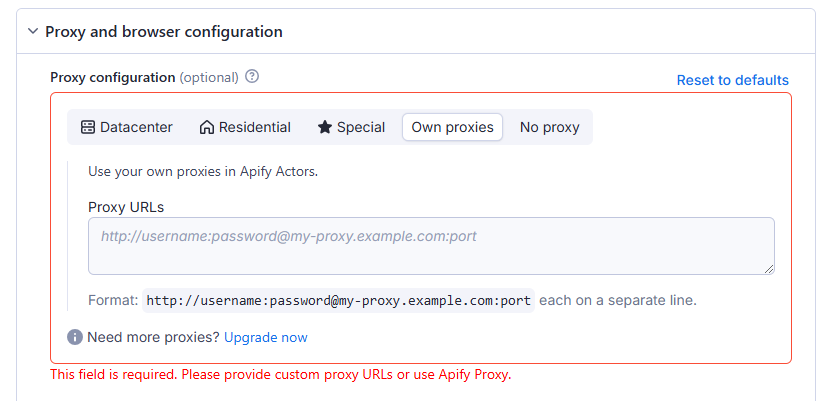
 1\. Scroll down to the **Proxy and Browser Configuration** section.
2\. Select **Own proxies** to enable custom proxy settings.
3\. Log in to your [Oculus Dashboard](https://oculusproxies.com/dashboard/page/plans).
4\. Click **Show Configured List** under the **Generic** tab to copy your proxy details.
5\. Paste the proxy information into the **Proxy URLs** field in Apify.
1\. Scroll down to the **Proxy and Browser Configuration** section.
2\. Select **Own proxies** to enable custom proxy settings.
3\. Log in to your [Oculus Dashboard](https://oculusproxies.com/dashboard/page/plans).
4\. Click **Show Configured List** under the **Generic** tab to copy your proxy details.
5\. Paste the proxy information into the **Proxy URLs** field in Apify.
 **Need a location-specific proxy?** Use the format `your-username-country-US` to connect to a U.S. server. Replace `US` with your desired country code.
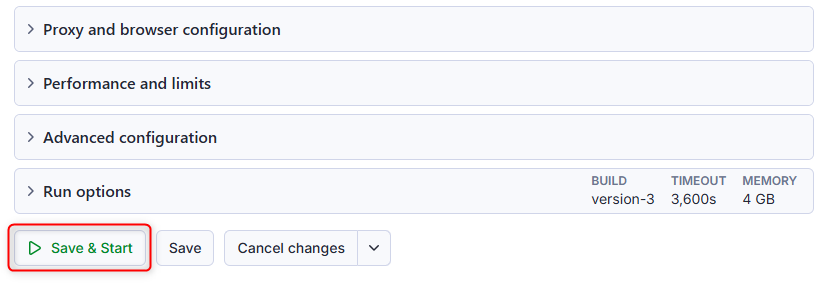
1\. After configuring the proxy, click **Save & Start** to run the actor.
2\. Apify will begin scraping data using your configured Oculus Proxy.
**Need a location-specific proxy?** Use the format `your-username-country-US` to connect to a U.S. server. Replace `US` with your desired country code.
1\. After configuring the proxy, click **Save & Start** to run the actor.
2\. Apify will begin scraping data using your configured Oculus Proxy.
 **Congratulations!** You’ve successfully integrated **Oculus Proxies** with **Apify**. Your scraping tasks will now run securely and efficiently, minimizing the risk of IP bans and detection. 🚀