> ## Documentation Index
> Fetch the complete documentation index at: https://docs.oculusproxies.com/llms.txt
> Use this file to discover all available pages before exploring further.
# How to Set Up Oculus Proxies With Helium Scraper
> Enhance your web scraping efficiency! By integrating Oculus Proxies with Helium Scraper, you can extract data securely, bypass restrictions, and maintain anonymity. Follow this guide to set up your proxies and streamline your data collection process.
 ## What is Helium Scraper?
Helium Scraper is your go-to tool for web scraping without the coding headaches. Its intuitive visual interface makes data extraction a breeze—just point, click, and collect!
Designed for small to medium-scale projects, Helium Scraper helps freelancers, marketers, and business professionals gather and organize web data efficiently. Whether you’re tracking prices, gathering leads, or conducting market research, it empowers you to get the job done without breaking a sweat or writing a single line of code.
If you're using **Oculus** to access search engines like **Google, Bing, or Yandex** and experiencing connection issues, your proxy type may need adjustment. **ISP Premium Proxies** provide stable and unrestricted access, preventing blocks that standard proxies might encounter. Switching to **ISP Premium Proxies** can improve performance.
## How to Integrate Oculus Proxies With Helium Scraper
1\. Visit the official [Helium Scraper website](https://www.heliumscraper.com/eng/download.php).
2\. Download and install the software.
3\. Open **Helium Scraper** after installation.
1\. In the **Helium Scraper** menu, navigate to **File** > **Proxy List**.
2\. This will open the proxy configuration panel.
## What is Helium Scraper?
Helium Scraper is your go-to tool for web scraping without the coding headaches. Its intuitive visual interface makes data extraction a breeze—just point, click, and collect!
Designed for small to medium-scale projects, Helium Scraper helps freelancers, marketers, and business professionals gather and organize web data efficiently. Whether you’re tracking prices, gathering leads, or conducting market research, it empowers you to get the job done without breaking a sweat or writing a single line of code.
If you're using **Oculus** to access search engines like **Google, Bing, or Yandex** and experiencing connection issues, your proxy type may need adjustment. **ISP Premium Proxies** provide stable and unrestricted access, preventing blocks that standard proxies might encounter. Switching to **ISP Premium Proxies** can improve performance.
## How to Integrate Oculus Proxies With Helium Scraper
1\. Visit the official [Helium Scraper website](https://www.heliumscraper.com/eng/download.php).
2\. Download and install the software.
3\. Open **Helium Scraper** after installation.
1\. In the **Helium Scraper** menu, navigate to **File** > **Proxy List**.
2\. This will open the proxy configuration panel.
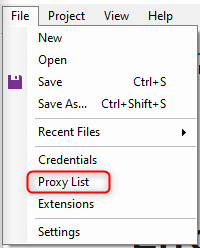 1\. In the **Proxy Configuration Panel**, enter the following details:
* **Host:** `proxy.oculus-proxy.com`
* **Port:** Enter the port number from your [Oculus Dashboard](https://oculusproxies.com/dashboard).
* **Username:** Input your **Oculus Proxy username**.
* **Password:** Input your **Oculus Proxy password**.
2\. Click **OK** to save the settings.
1\. In the **Proxy Configuration Panel**, enter the following details:
* **Host:** `proxy.oculus-proxy.com`
* **Port:** Enter the port number from your [Oculus Dashboard](https://oculusproxies.com/dashboard).
* **Username:** Input your **Oculus Proxy username**.
* **Password:** Input your **Oculus Proxy password**.
2\. Click **OK** to save the settings.
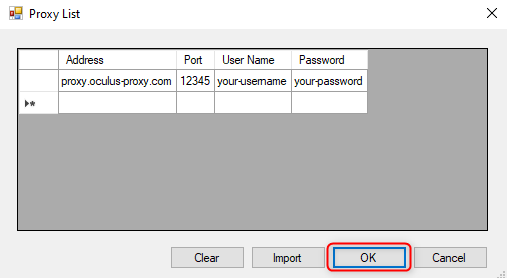 Need a **region-specific proxy**? Modify your username format to include a country code (e.g., `your-username-country-US` for a US-based proxy).
1\. Open the **Project** menu and select **Settings**.
Need a **region-specific proxy**? Modify your username format to include a country code (e.g., `your-username-country-US` for a US-based proxy).
1\. Open the **Project** menu and select **Settings**.
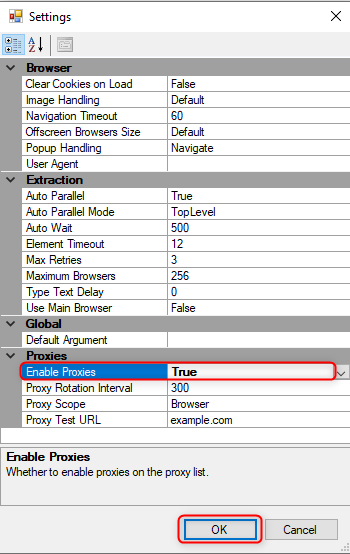
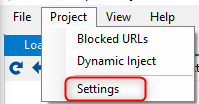 2\. In the settings window, find the **Enable Proxies** option and set it to **True**.
 1\. Open the built-in browser in **Helium Scraper**.
2\. Visit [httpbin.org/ip](http://httpbin.org/ip) to check your active IP address.
3\. Ensure that the displayed IP matches your **Oculus Proxy** settings.
**Success!** You’ve now integrated **Oculus Proxies** with **Helium Scraper**. Enjoy a seamless, anonymous, and efficient web scraping experience! 🚀
1\. Open the built-in browser in **Helium Scraper**.
2\. Visit [httpbin.org/ip](http://httpbin.org/ip) to check your active IP address.
3\. Ensure that the displayed IP matches your **Oculus Proxy** settings.
**Success!** You’ve now integrated **Oculus Proxies** with **Helium Scraper**. Enjoy a seamless, anonymous, and efficient web scraping experience! 🚀