> ## Documentation Index
> Fetch the complete documentation index at: https://docs.oculusproxies.com/llms.txt
> Use this file to discover all available pages before exploring further.
# How to Set Up Oculus Proxies with ParseHub
> Optimize your data extraction workflows with Oculus Proxies on ParseHub. This guide will walk you through configuring secure proxy connections for efficient, anonymous, and reliable web scraping.
 ## What is ParseHub?
**ParseHub** is a user-friendly web scraping tool that allows you to extract data from websites effortlessly. Its visual point-and-click interface makes it easy for both beginners and advanced users to create complex scraping workflows. By integrating **Oculus Proxies**, you can bypass restrictions, avoid IP bans, and perform geo-targeted scraping with greater efficiency.
If you're using **Oculus** to access search engines like **Google, Bing, or Yandex** and facing connection issues, the proxy type could be the reason. **ISP Premium Proxies** ensure stable and unrestricted access, preventing blocks that standard proxies might encounter. Switching to **ISP Premium Proxies** can help maintain smooth and reliable performance.
## How to Set Up Oculus Proxies with ParseHub
1\. Open **ParseHub** on your desktop or log in to the [web app](https://www.parsehub.com/).
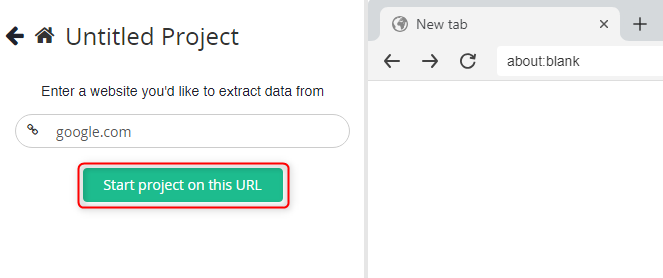
2\. Click **New Project** and enter the URL of the website you want to scrape.
## What is ParseHub?
**ParseHub** is a user-friendly web scraping tool that allows you to extract data from websites effortlessly. Its visual point-and-click interface makes it easy for both beginners and advanced users to create complex scraping workflows. By integrating **Oculus Proxies**, you can bypass restrictions, avoid IP bans, and perform geo-targeted scraping with greater efficiency.
If you're using **Oculus** to access search engines like **Google, Bing, or Yandex** and facing connection issues, the proxy type could be the reason. **ISP Premium Proxies** ensure stable and unrestricted access, preventing blocks that standard proxies might encounter. Switching to **ISP Premium Proxies** can help maintain smooth and reliable performance.
## How to Set Up Oculus Proxies with ParseHub
1\. Open **ParseHub** on your desktop or log in to the [web app](https://www.parsehub.com/).
2\. Click **New Project** and enter the URL of the website you want to scrape.
 3\. Click **Start Project on this URL** to begin your scraping project.
 1\. In your project workspace, locate the **Browser** setting and toggle it to *On* to enable advanced scraping options.
2\. Click the **cogwheel icon** in the top-left corner and select **Settings** to access the project configuration options.
1\. In your project workspace, locate the **Browser** setting and toggle it to *On* to enable advanced scraping options.
2\. Click the **cogwheel icon** in the top-left corner and select **Settings** to access the project configuration options.
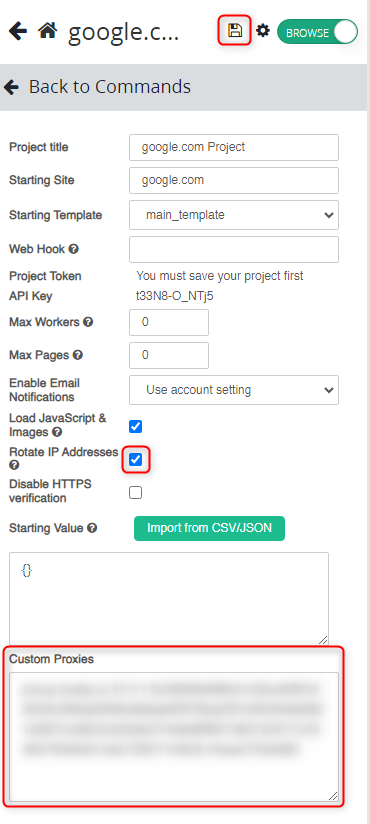
 1\. Enable the option **Rotate IP Addresses** for better anonymity.
2\. Log in to your [Oculus Dashboard](https://oculusproxies.com/dashboard/page/plans).
3\. Click **Show Configured List** under the **Generic** tab to copy your proxy details.
4\. Paste the proxy information into the **Custom Proxies** field in ParseHub.
5\. Click **Save** icon to apply the settings.
1\. Enable the option **Rotate IP Addresses** for better anonymity.
2\. Log in to your [Oculus Dashboard](https://oculusproxies.com/dashboard/page/plans).
3\. Click **Show Configured List** under the **Generic** tab to copy your proxy details.
4\. Paste the proxy information into the **Custom Proxies** field in ParseHub.
5\. Click **Save** icon to apply the settings.
 For geo-targeted proxies, include the country code in your username (e.g., `your-username-country-US`) to route traffic through a specific region.
**Congratulations!** You’ve successfully integrated **Oculus Proxies** with **ParseHub**. Your scraping tasks are now secure, private, and efficient, allowing you to focus on extracting valuable data without interruptions.
For geo-targeted proxies, include the country code in your username (e.g., `your-username-country-US`) to route traffic through a specific region.
**Congratulations!** You’ve successfully integrated **Oculus Proxies** with **ParseHub**. Your scraping tasks are now secure, private, and efficient, allowing you to focus on extracting valuable data without interruptions.