> ## Documentation Index
> Fetch the complete documentation index at: https://docs.oculusproxies.com/llms.txt
> Use this file to discover all available pages before exploring further.
# How to Set Up Proxies With Undetectable
> Enhance your browsing privacy and security! By integrating Oculus Proxies with Undetectable, you can create unique browser profiles while maintaining anonymity. Follow this guide to configure your proxies seamlessly.
 ## What is Undetectable?
**Undetectable** is an anti-detect browser designed to help users manage multiple accounts securely. It creates distinct browser profiles with unique digital fingerprints, making it ideal for tasks like account management, web scraping, and automation—all with enhanced privacy. Pairing it with **Oculus Proxies** ensures reliable and anonymous connections for all your online activities.
If you're using **Oculus** to access search engines like **Google, Bing, or Yandex** and facing connection issues, the proxy type could be the reason. **ISP Premium Proxies** ensure stable and unrestricted access, preventing blocks that standard proxies might encounter. Switching to **ISP Premium Proxies** can help maintain smooth and reliable performance.
## How to Integrate Oculus Proxies With Undetectable
1\. Start by downloading the application from the [Undetectable website](https://undetectable.io/).
2\. Install the software on your system and log in with your account credentials to access the main dashboard.
1\. Once logged in, navigate to the **Proxy** tab within the application.
## What is Undetectable?
**Undetectable** is an anti-detect browser designed to help users manage multiple accounts securely. It creates distinct browser profiles with unique digital fingerprints, making it ideal for tasks like account management, web scraping, and automation—all with enhanced privacy. Pairing it with **Oculus Proxies** ensures reliable and anonymous connections for all your online activities.
If you're using **Oculus** to access search engines like **Google, Bing, or Yandex** and facing connection issues, the proxy type could be the reason. **ISP Premium Proxies** ensure stable and unrestricted access, preventing blocks that standard proxies might encounter. Switching to **ISP Premium Proxies** can help maintain smooth and reliable performance.
## How to Integrate Oculus Proxies With Undetectable
1\. Start by downloading the application from the [Undetectable website](https://undetectable.io/).
2\. Install the software on your system and log in with your account credentials to access the main dashboard.
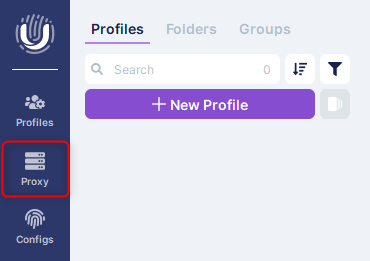
1\. Once logged in, navigate to the **Proxy** tab within the application.
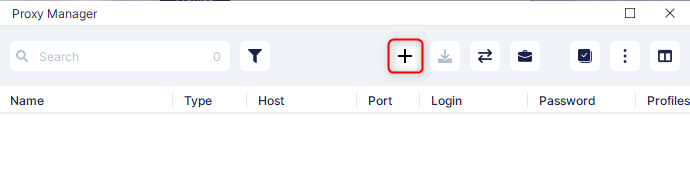
 2\. Locate the **Add Proxy** option by clicking on the **Plus** icon.
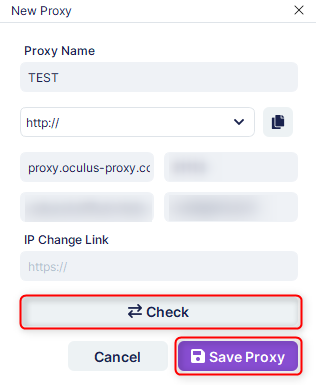
 1\. Assign a descriptive name in the **Proxy Name** field for easier organization.
2\. Retrieve your proxy details from your [Oculus Dashboard](https://oculusproxies.com/dashboard/page/plans), and fill in the following fields:
* **Proxy Type**: Choose HTTP or SOCKS5, depending on your proxy type.
* **Host**: Input `proxy.oculus-proxy.com`.
* **Port**: Enter the port number provided in your Oculus dashboard.
* **Username**: Use your Oculus Proxy username.
* **Password**: Input your Oculus Proxy password.
3\. Use the **Check** button to test the connection. Ensure the proxy is working correctly.
4\. Once verified, click **Save Proxy** to store your settings.
1\. Assign a descriptive name in the **Proxy Name** field for easier organization.
2\. Retrieve your proxy details from your [Oculus Dashboard](https://oculusproxies.com/dashboard/page/plans), and fill in the following fields:
* **Proxy Type**: Choose HTTP or SOCKS5, depending on your proxy type.
* **Host**: Input `proxy.oculus-proxy.com`.
* **Port**: Enter the port number provided in your Oculus dashboard.
* **Username**: Use your Oculus Proxy username.
* **Password**: Input your Oculus Proxy password.
3\. Use the **Check** button to test the connection. Ensure the proxy is working correctly.
4\. Once verified, click **Save Proxy** to store your settings.
 For region-specific proxies, append the desired country code to your username (e.g., `your-username-country-US` for a US-based proxy).
**That’s it!** Integrating **Oculus Proxies** with **Undetectable** ensures secure, private, and efficient browsing for all your needs. Whether you’re managing multiple accounts, bypassing geo-restrictions, or enhancing automation workflows, this setup offers unmatched reliability and anonymity.
For region-specific proxies, append the desired country code to your username (e.g., `your-username-country-US` for a US-based proxy).
**That’s it!** Integrating **Oculus Proxies** with **Undetectable** ensures secure, private, and efficient browsing for all your needs. Whether you’re managing multiple accounts, bypassing geo-restrictions, or enhancing automation workflows, this setup offers unmatched reliability and anonymity.