> ## Documentation Index
> Fetch the complete documentation index at: https://docs.oculusproxies.com/llms.txt
> Use this file to discover all available pages before exploring further.
# How to Set Up Oculus Proxies With WebHarvy
> Enhance your web scraping capabilities by integrating Oculus Proxies with WebHarvy. Follow this guide to configure proxies for secure, efficient, and anonymous data collection.
 ## What is WebHarvy?
**WebHarvy** is a user-friendly point-and-click web scraping software that allows you to extract data from websites without requiring any coding. Its built-in browser, automation tools, and scheduling features make it ideal for scraping large amounts of data quickly and efficiently. By integrating **Oculus Proxies**, you can ensure anonymous, uninterrupted scraping while bypassing geo-restrictions and avoiding IP bans.
If you're using **Oculus** to access search engines like **Google, Bing, or Yandex** and facing connection issues, the proxy type could be the reason. **ISP Premium Proxies** ensure stable and unrestricted access, preventing blocks that standard proxies might encounter. Switching to **ISP Premium Proxies** can help maintain smooth and reliable performance.
## How to Integrate Oculus Proxies With WebHarvy
1\. Visit the [WebHarvy website](https://www.webharvy.com/).
2\. Download the application and complete the installation process by following the on-screen instructions.
3\. Launch WebHarvy and log in to your account.
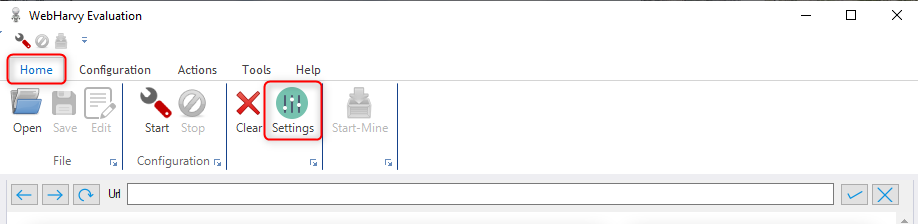
1\. On the WebHarvy interface, go to the **Home** tab.
2\. Click on **Settings** and select **Proxy Settings** from the dropdown menu.
## What is WebHarvy?
**WebHarvy** is a user-friendly point-and-click web scraping software that allows you to extract data from websites without requiring any coding. Its built-in browser, automation tools, and scheduling features make it ideal for scraping large amounts of data quickly and efficiently. By integrating **Oculus Proxies**, you can ensure anonymous, uninterrupted scraping while bypassing geo-restrictions and avoiding IP bans.
If you're using **Oculus** to access search engines like **Google, Bing, or Yandex** and facing connection issues, the proxy type could be the reason. **ISP Premium Proxies** ensure stable and unrestricted access, preventing blocks that standard proxies might encounter. Switching to **ISP Premium Proxies** can help maintain smooth and reliable performance.
## How to Integrate Oculus Proxies With WebHarvy
1\. Visit the [WebHarvy website](https://www.webharvy.com/).
2\. Download the application and complete the installation process by following the on-screen instructions.
3\. Launch WebHarvy and log in to your account.
1\. On the WebHarvy interface, go to the **Home** tab.
2\. Click on **Settings** and select **Proxy Settings** from the dropdown menu.
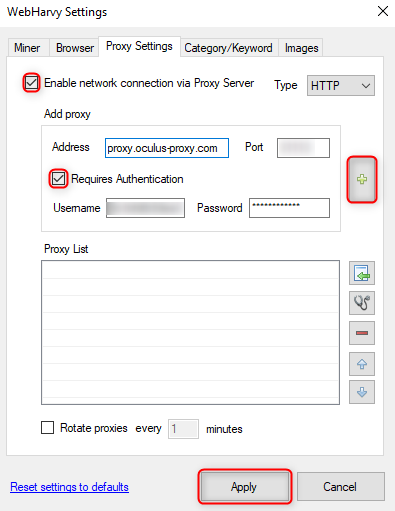
 1\. In the proxy settings panel check **Enable network connection via Proxy Server**.
2\. Check the box for **Requires Authentication** to enable credential input.
3\. Enter your Oculus proxy details as follows:
* **Address**: `proxy.oculus-proxy.com`.
* **Port**: Input the port number from your [Oculus Dashboard](https://oculusproxies.com/dashboard/page/plans).
* **Username**: Enter your Oculus Proxy username.
* **Password**: Enter your Oculus Proxy password.
4\. Click the **Plus (+)** button to add the proxy and then hit **Apply** to save the configuration.
1\. In the proxy settings panel check **Enable network connection via Proxy Server**.
2\. Check the box for **Requires Authentication** to enable credential input.
3\. Enter your Oculus proxy details as follows:
* **Address**: `proxy.oculus-proxy.com`.
* **Port**: Input the port number from your [Oculus Dashboard](https://oculusproxies.com/dashboard/page/plans).
* **Username**: Enter your Oculus Proxy username.
* **Password**: Enter your Oculus Proxy password.
4\. Click the **Plus (+)** button to add the proxy and then hit **Apply** to save the configuration.
 If you need a proxy for a specific region, adjust your username format to include the country code (e.g., `your-username-country-US` for a US-based proxy).
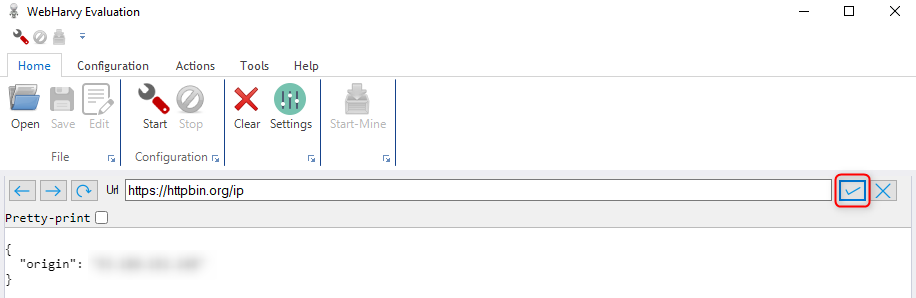
1\. Start a scraping session in WebHarvy.
2\. Use a website like [httpbin.org/ip](http://httpbin.org/ip) to test if the proxy is working correctly.
3\. Confirm that the displayed IP matches the one assigned by your Oculus Proxy setup.
If you need a proxy for a specific region, adjust your username format to include the country code (e.g., `your-username-country-US` for a US-based proxy).
1\. Start a scraping session in WebHarvy.
2\. Use a website like [httpbin.org/ip](http://httpbin.org/ip) to test if the proxy is working correctly.
3\. Confirm that the displayed IP matches the one assigned by your Oculus Proxy setup.
 **That’s it!** With **Oculus Proxies** integrated into **WebHarvy**, you can now perform secure, anonymous, and efficient data scraping. Enjoy hassle-free access to geo-restricted content and uninterrupted workflows tailored to your needs. Happy scraping!