> ## Documentation Index
> Fetch the complete documentation index at: https://docs.oculusproxies.com/llms.txt
> Use this file to discover all available pages before exploring further.
# Plan Auto-Renew
> Easily control your plan's auto-renewal settings. Enable or disable it anytime for a seamless experience.
* Navigate to your [dashboard](https://oculusproxies.com/dashboard/page/plans) and locate the proxy plan for which you want to enable auto-renewal.
* Hover over the **Auto-Renewal Disabled** tag. A renewal option will appear, click on it to enable auto-renewal.
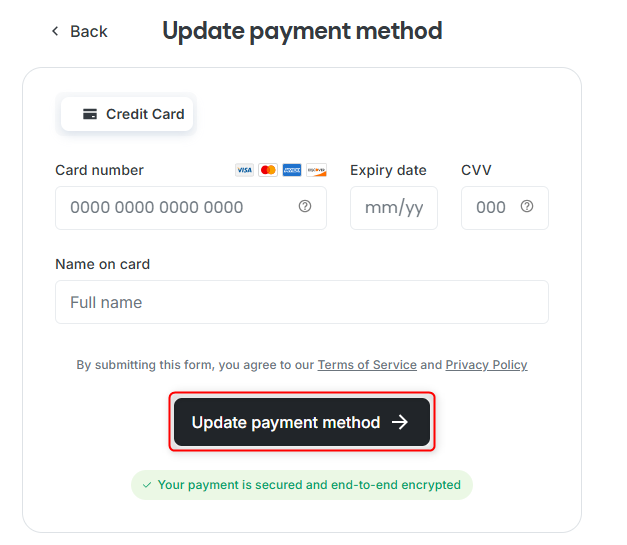
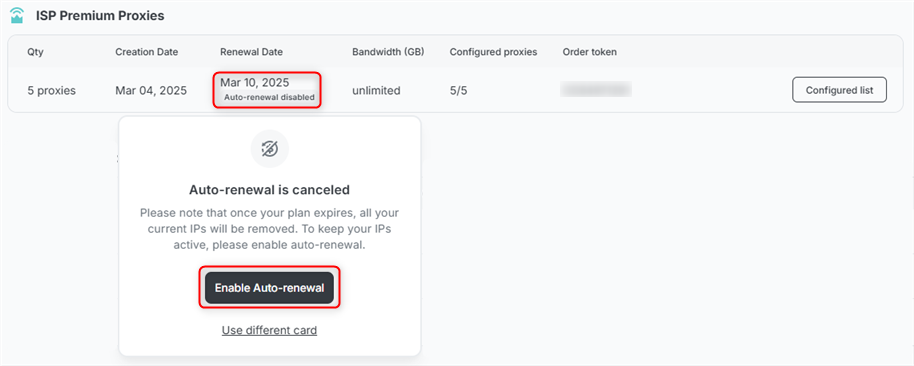 If this is your **first payment** for a proxy, you’ll be prompted to set up a payment method. If you already have a saved payment option, the renewal will be processed automatically.
 Turn on Plan Auto-Renewal to make sure you don’t lose your IPs after renewal!
Open [Subscriptions and Payments](https://oculusproxies.com/dashboard/page/account/section/active), locate the proxy you wish to disable auto-renewal for, and click **Manage Subscription**.
Turn on Plan Auto-Renewal to make sure you don’t lose your IPs after renewal!
Open [Subscriptions and Payments](https://oculusproxies.com/dashboard/page/account/section/active), locate the proxy you wish to disable auto-renewal for, and click **Manage Subscription**.
 Under **Payment Type**, select **Cancel Auto-Renewal**.
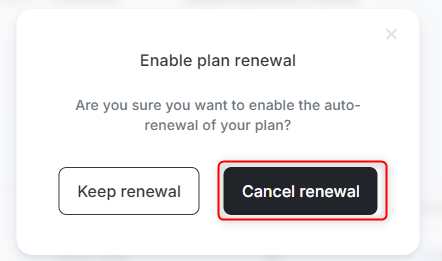
 Click **Cancel Renewal** to finalize the process.
 If Plan Auto-Renewal is turned off, your IPs will be released once the plan expires and may be claimed by other users!
You can re-enable auto-renewal anytime through your [dashboard](https://oculusproxies.com/dashboard/page/plans) if you change your mind.
If Plan Auto-Renewal is turned off, your IPs will be released once the plan expires and may be claimed by other users!
You can re-enable auto-renewal anytime through your [dashboard](https://oculusproxies.com/dashboard/page/plans) if you change your mind.