> ## Documentation Index
> Fetch the complete documentation index at: https://docs.oculusproxies.com/llms.txt
> Use this file to discover all available pages before exploring further.
# Events & E-commerce ISP Proxies Proxy Rotation
> Easily refresh your ISP proxies directly from the Oculus Proxies dashboard. With this proxy rotation feature, you can swap out non-working proxies for new ones instantly — without waiting for support.
## What is Proxy Rotation?
The **Proxy Rotation** feature allows you to manually refresh your ISP proxies in the Oculus Proxies dashboard if your current ones aren’t working as expected. Instead of reaching out to support, you can rotate your proxies instantly within your **Events & E-commerce ISP Proxies** plan.
This feature provides greater flexibility and control, ensuring uninterrupted access to your online activities.
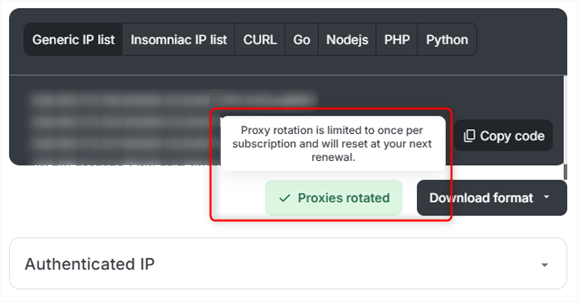
Proxy rotation is available only once per **subscription/renewal period**. If you have already rotated your proxies, you will need to wait until your next renewal.
## How to Rotate Proxies in Your Oculus Proxies Dashboard
1\. Log in to your [Oculus Proxies dashboard](https://oculusproxies.com/dashboard/page/plans).
2\. Navigate to your **Events & E-commerce ISP Proxies** plan.
1\. Find the **proxy token** you want to rotate.
2\. Hover over the token and click on **Configured list**.
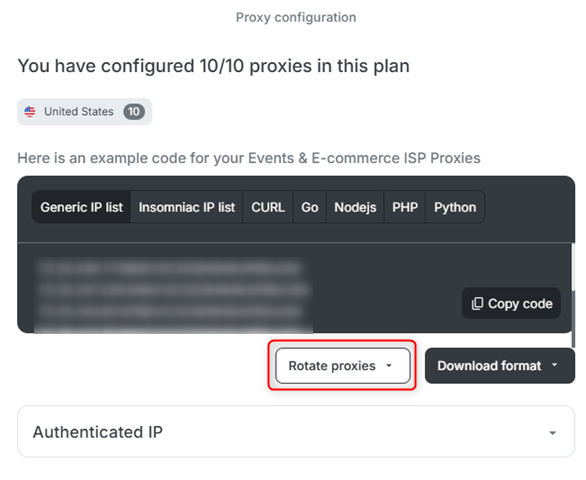
 1\. In the **Configured list** section, look for the **Rotate Proxies** button under the selected format.
2\. Click **Rotate Proxies** to proceed.
1\. In the **Configured list** section, look for the **Rotate Proxies** button under the selected format.
2\. Click **Rotate Proxies** to proceed.
 1\. A list of available servers will appear.
2\. Choose a server that best fits your needs and click on it to finalize the rotation.
1\. A list of available servers will appear.
2\. Choose a server that best fits your needs and click on it to finalize the rotation.
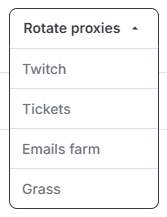 Proxy rotation within specific server categories (e.g., Twitch) depends on availability. If no alternative servers are available, you will need to try again later.
1\. **Proxy rotation is limited** to **once per subscription/renewal period**.
2\. If you attempt to rotate proxies again before your renewal, you will see a **notification message** indicating that rotation is unavailable.
Proxy rotation within specific server categories (e.g., Twitch) depends on availability. If no alternative servers are available, you will need to try again later.
1\. **Proxy rotation is limited** to **once per subscription/renewal period**.
2\. If you attempt to rotate proxies again before your renewal, you will see a **notification message** indicating that rotation is unavailable.
 1\. After rotating, test your new proxies to ensure they work as expected.
2\. You can verify by checking your new IP via [httpbin.org/ip](http://httpbin.org/ip).
By using the **Proxy Rotation** feature in Oculus Proxies, you gain full control over your IPs without needing support intervention. Whether you're troubleshooting or optimizing your setup, this tool helps you stay connected seamlessly. Try it today!
1\. After rotating, test your new proxies to ensure they work as expected.
2\. You can verify by checking your new IP via [httpbin.org/ip](http://httpbin.org/ip).
By using the **Proxy Rotation** feature in Oculus Proxies, you gain full control over your IPs without needing support intervention. Whether you're troubleshooting or optimizing your setup, this tool helps you stay connected seamlessly. Try it today!