What is SocksDroid?
SocksDroid is a powerful proxy-based VPN client for Android that leverages the system’s built-in VPN functionality. Unlike traditional VPN services, it does not provide its own servers but allows users to configure and connect to their preferred proxy servers. By using Oculus Proxies, you can further optimize your proxy setup, ensuring a seamless and secure browsing experience.How to Integrate Oculus Proxies With SocksDroid
1
Install SocksDroid
Download SocksDroid and install it on your Android device.
2
Enter Proxy Details
1. Open the SocksDroid app.2. Insert the following details: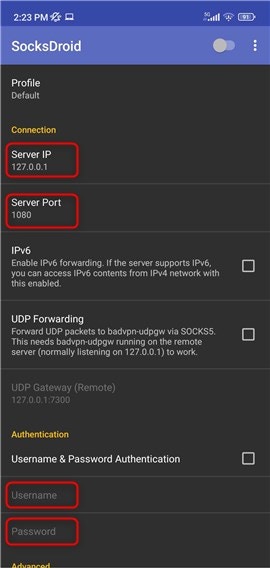
-
Server IP (Host):
proxy.oculus-proxy.com -
Server Port:
31115 - Username: Your Oculus Proxy username
- Password: Your Oculus Proxy password
3
Enable the Proxy
1. Turn on the proxy by toggling the switch at the top of the screen.2. The connection will initialize.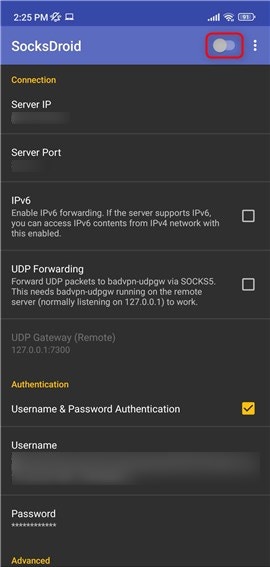
4
Approve the Connection
1. If a consent screen appears, press OK to allow the connection.2. This grants SocksDroid permission to establish a secure proxy-based VPN session.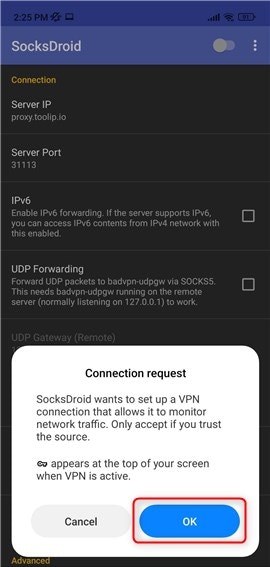
5
Verify Connection Status
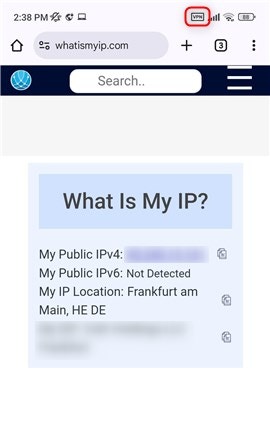
1. Once connected successfully, a VPN icon will appear in your device’s top bar.2. This indicates that all your traffic is now routed through Oculus Proxies, ensuring a secure and anonymous browsing experience.