


What is Maskfog?
Maskfog is an anti-detect browser designed to create unique browser profiles for secure and anonymous account management. It helps users bypass restrictions, prevent detection, and maintain privacy. When paired with Oculus Proxies, Maskfog provides enhanced security, anonymity, and the ability to target specific regions for your tasks.How to Integrate Oculus Proxies with Maskfog
1
Download and Install Maskfog
1. Visit the Maskfog website to download the application.2. Install it on your system.3. Log in using your credentials to access the dashboard.
2
Create a New Proxy Configuration
1. Open Maskfog and navigate to the Proxy Service section.2. Click Configure Device to start creating a new proxy configuration.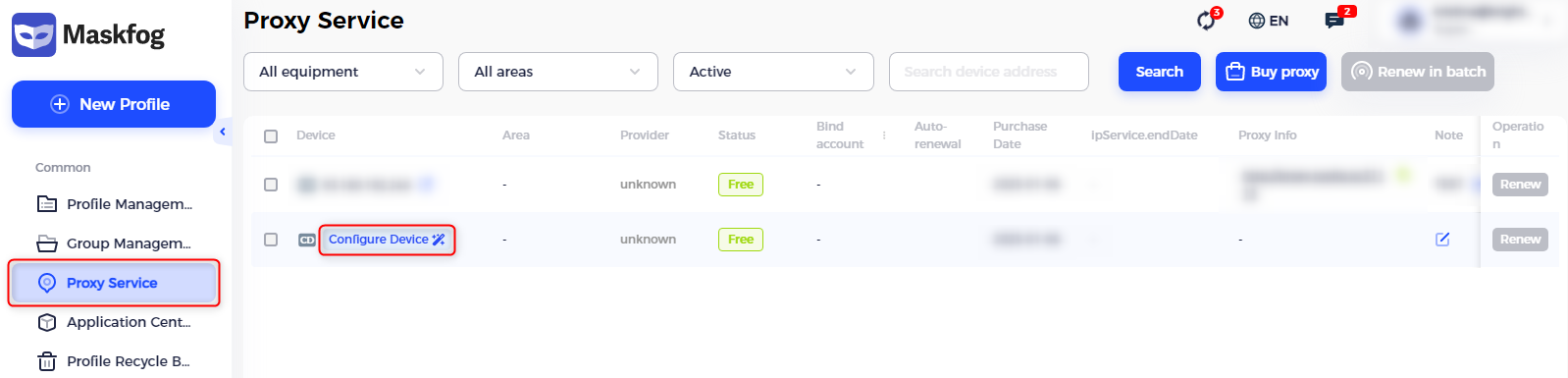
3
Enter Your Proxy Details
1. Assign a name to your configuration in the Proxy Name field to easily recognize it later.2. Fill in the proxy credentials retrieved from your Oculus Dashboard: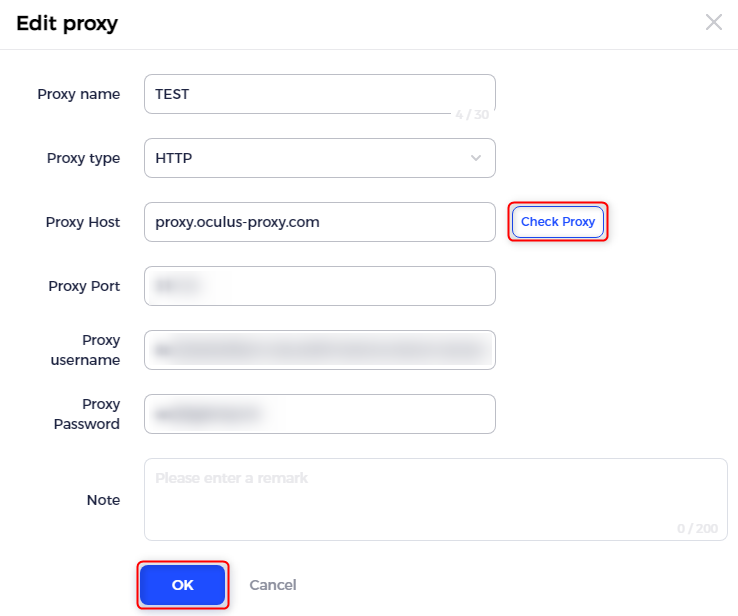
- Proxy Type: Choose HTTP, HTTPS, or SOCKS5 based on your proxy type.
-
Proxy Host: Input
proxy.oculus-proxy.com. - Proxy Port: Enter the port number provided in your dashboard.
- Username: Use your Oculus Proxy username.
- Password: Enter your Oculus Proxy password.